Mini Me Editor: an `sbx` kit that bundles Mini Me and Eclipse Theia
Mini Me Editor is an sbx kit bundling the Mini Me agent with the Eclipse Theia web IDE, for a fully sandboxed dev environment in your browser.

Following up on the previous blog post: The SBX Kit for Mini Me is now published on Docker Hub, I created a new kit to get an sbx sandbox that brings both the Mini Me agent (or mm) and a web IDE: Eclipse Theia. This way, I have everything I need in a fully secured environment (thanks to sbx), IDE included, which I connect to using my browser. (For those who have known me for a long time, I used to be a big fan of GitPod, and I love reproducing that experience locally on my machine.)
But let's see how to use this new kit.
We need an mm agent
You can create your own configuration file as explained here: Hello Mini Me: an agent born while preparing a talk for Devoxx: First configuration.
Or copy one of the samples I provide at https://rickub.com/bots-garden/squadron:
mkdir demo
cd demo

git clone --depth 1 --filter=blob:none --sparse https://git.rickub.com/bots-garden/squadron.git /tmp/squadron &&
git -C /tmp/squadron sparse-checkout set little-coder &&
cp -a /tmp/squadron/little-coder/. . &&
rm -rf /tmp/squadron
And now it's time to start a new sbx sandbox.
Let's start "Mini Me Editor"
sbx run -d --name mm-little-coder -p 8080:3000 docker.io/k33g/mini-me-editor-kit:0.0.2 \
--kit docker.io/k33g/go-toolchain-kit:0.0.2
So, --kit docker.io/k33g/go-toolchain-kit:0.0.2 isn't mandatory, but since I needed to develop in Go I added one of the kits I had created to get the Go toolchain (cf. the previous blog post: The SBX Kit for Mini Me is now published on Docker Hub).
⏳ Wait a few moments for the kits to be downloaded. You should get an output like this one:
sandbox    mm-little-coder
agent      mini-me-editor-kit
kit        docker.io/k33g/mini-me-editor-kit:0.0.2
           docker.io/k33g/go-toolchain-kit:0.0.2
workspace  ~/kDrive/Rickub/demo-mini-me-editor/demo (rw)
image      docker.io/k33g/mini-me-editor-kit@sha256:c1fbbd72c0992ee799bf064a563dd127980dbe640002b3706461cfae9f8f498f
cpu        10
memory     16 GiB

✓ Image ready
→ assemble kit image from 2 kits
→ pull kit image docker.io/k33g/go-toolchain-kit:0.0.2
→ check kit file collisions
✓ assembled kit image (25 layers)
→ register 1 startup command(s), run on every container start
  + /usr/local/bin/start-theia (kit=mini-me-editor-kit, background, user=1000)
  view startup log: cat /var/log/sbx-kit-startup.log
  Published 127.0.0.1:8080 -> 3000/tcp4
  Published theia: localhost:49163 -> 3000/tcp
✓ Created sandbox mm-little-coder

Starting mini-me-editor-kit agent in sandbox 'mm-little-coder'...
Workspace: /Users/k33g/kDrive/Rickub/demo-mini-me-editor/demo
40fde05b-f90a-4f72-bda5-6753fe5a6e41
And now you can open Mini Me Editor in your favorite browser with the following url: http://localhost:8080


And you can run the mm --tui command in a terminal of the IDE to use Mini Me in its new environment:

Don't leave just yet, it's not over! Let's talk about ACP
You should remember that Mini Me supports the ACP (Agent Client Protocol) protocol, otherwise go read Mini Me and the ACP protocol (Agent Client Protocol).
So I installed the ACP Patchbay extension directly in Eclipse Theia:
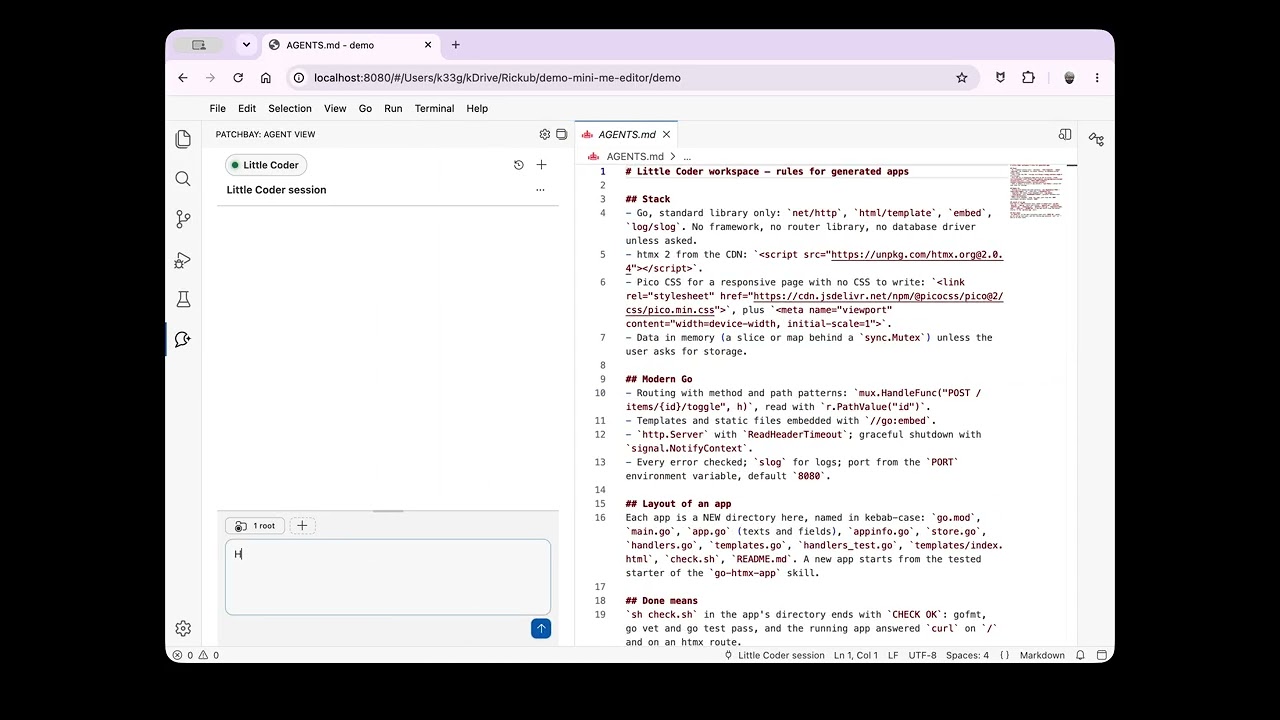
There you go, I hope this makes you want to play with Mini Me, but also makes you understand the importance and usefulness of Docker sbx.
See you soon for a next episode.
Written by
Keep reading
Mini Me and the ACP protocol (Agent Client Protocol)
Plug Mini Me into Zed and VSCode through the Agent Client Protocol, directly or running inside a Docker sbx sandbox, with a ready-made translator agent.

The SBX Kit for Mini Me is now published on Docker Hub
The Mini Me SBX kit is now published on Docker Hub, letting you launch a sandboxed Mini Me agent with a single command.

Don't let your agents roam free in the wild: Mini Me gets its `sbx` kit
Build a Docker sbx kit for Mini Me to run the agent in an isolated sandbox, locally or from a remote repository, and extend it with additional kits.

No comments yet. Be the first to comment!